
How to sign a contract online without accounts
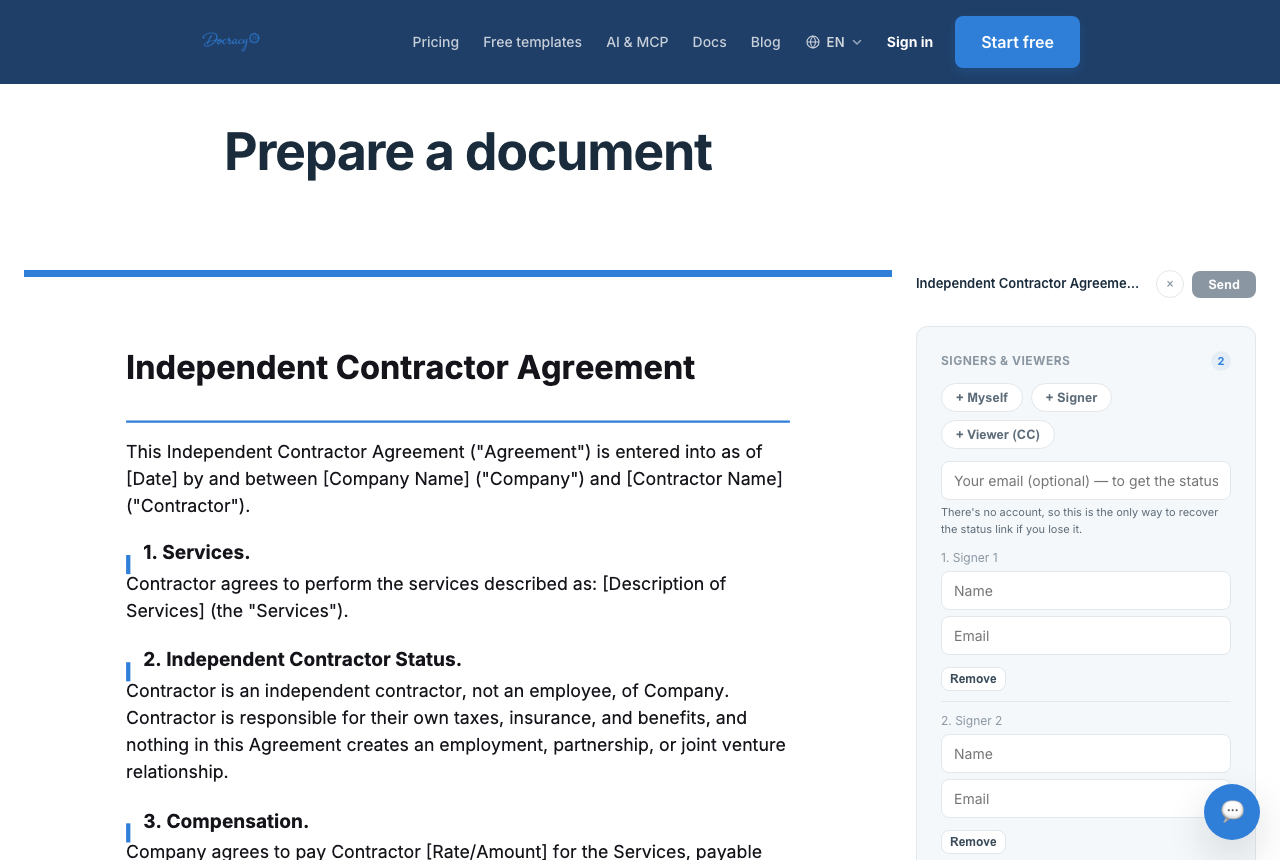

Signing a contract used to mean print, sign, scan, email — or worse, mail it and wait. Online signing collapses that into a single flow: upload, add fields, send, sign, download — and it's legally binding in most countries without either side creating an account. The mechanics are simple enough to learn in one read-through, but a few decisions along the way, like sequential versus parallel signing, make a real difference once more than two people are involved.
The flow, step by step
- Upload the contract as a PDF, or start from a template if you don't have one yet
- Add signature and date fields where each party needs to sign
- Send it — the other party gets a link by email
- They review and sign directly in the browser, no software install or account required
- Download the completed, signed PDF once everyone's done
Sequential vs. parallel signing: which one you actually want
Every multi-signer contract has to decide, at least implicitly, whether signers go one at a time or all at once. Sequential (ordered) signing sends the document to the first signer, and the second signer doesn't get access — or even a notification — until the first one has finished. Parallel signing sends the same link to everyone at the same time, and whoever signs first, signs first, with no waiting on anyone else.
- Use sequential signing when terms should be reviewed and approved in a specific order — an employee signs first, then a manager countersigns, or a vendor accepts terms before a client's finance team signs off on payment
- Use sequential signing when a later signer's obligations depend on an earlier one actually agreeing — there's no point asking a guarantor to co-sign before the primary party has committed
- Use parallel signing when multiple independent parties are agreeing to the same terms with no dependency between them, like three co-founders signing an operating agreement
- Use parallel signing whenever speed matters more than sequencing — by definition it's the faster of the two, since nobody is waiting on anybody else
What happens on the sender's side
The person preparing the contract uploads it as a PDF exactly as it already exists — no reformatting needed. From there, fields get placed on the document marking where each signer needs to sign, initial, or fill in a date. On paid plans, field placement can be auto-detected from patterns in the document, like signature lines or "Date:" labels, to speed this up — though it's pattern-matching rather than true document understanding, so it's worth a quick check rather than blind trust on anything unusually formatted. Manual field placement always works regardless of plan and takes maybe another minute for a typical one- or two-page contract. Once fields are placed and assigned to the right signer, and the signing order is set if it matters, the sender clicks send.
What happens on the signer's side
The signer gets an email with a link — no account, no password, no software to install. Opening the link shows the document directly in the browser, with the fields needing attention highlighted. They review the terms, type or draw a signature, check a box confirming they intend to sign electronically, and submit. That's the entire experience from their end, and it typically takes under two minutes for a straightforward contract. If the document is set up for sequential signing and it isn't their turn yet, they simply won't have anything to click until the prior signer finishes.
Signing from a phone
Because the whole flow runs in a browser, there's no meaningful difference between signing on a laptop and signing on a phone — the same link opens the same document, and a signature can be drawn with a finger instead of a mouse. This matters more than it sounds: a lot of real-world signers are looking at the email between meetings, not sitting at a desk, and a contract is far more likely to get signed the same day if it doesn't require finding a computer first.
Why this counts as a real signature
Under laws like the U.S. ESIGN Act and the EU's eIDAS regulation, what makes an electronic signature valid is intent to sign, consent to sign electronically, and a reliable record of the transaction — not the visual style of the signature itself. A typed name confirmed through a proper e-signature flow generally carries the same legal weight as a signature on paper.
That said, a standard e-signature confirms what was signed and when — it doesn't verify the signer's identity the way a notarized or identity-verified signature would. For everyday contracts between people who already know each other, that distinction rarely matters in practice.
What the audit trail actually captures
Every step gets logged automatically: when the document was delivered, when it was opened, and when it was signed, each with a timestamp. The completed PDF also gets a SHA-256 hash recorded against it, so any later alteration to the file would produce a different hash and be detectable — useful if a signed contract's authenticity is ever questioned. What this doesn't do is verify identity the way a notarized signature or a government-ID check would: it records the IP address and timestamp of whoever clicked the link, not a verified legal identity. For contracts between people who already know each other, that's rarely an issue; for a scenario involving strangers or high-value transactions, it's worth knowing the limitation going in.
Where this saves the most time
- Contracts that need to close the same day a deal is agreed on
- Multi-party contracts, where mailing a paper copy around would take a week by itself
- Recurring contracts with the same structure — a saved template skips the setup step entirely
- Contracts with two or fewer signers, which cost nothing to send
Why teams start with Docracy
“Docracy is a great product that I have tested and am using. It is easy to use, has good tools, is always up to date, and implements new features. Highly recommended.”— DACH Advisory


Also: Compare e-sign pricing · Free mutual NDA template
No account required for up to 2 signers.