
Best DocuSign alternatives for simple agreements

DocuSign built its reputation on enterprise-scale, compliance-grade signing — deep integrations, identity verification options, envelope-based bulk workflows. That's exactly right for a large organization with regulatory requirements. It's a lot of tool for someone who just needs an NDA or a freelance contract signed by tomorrow.
What to actually look for in a simpler alternative
- No account required for the person signing — this alone rules out several "lightweight" tools that still gate signing behind a signup
- Pricing that doesn't scale per seat, if you're not managing a large team
- A short path from upload to sent, without a multi-step setup wizard
- Enough audit trail to prove what was signed and when, even without enterprise compliance features
Where DocuSign is genuinely still the right call
If your contracts legally require identity-verified or qualified electronic signatures, or you need deep integration with Salesforce, SAP, or a similar enterprise stack, DocuSign's scale and compliance certifications are earning their price. Simplicity isn't the right tradeoff for every situation.
Where a lighter tool fits better
For quick, low-stakes agreements — freelance contracts, NDAs, one-off vendor deals — most of DocuSign's enterprise features go unused, while its per-seat pricing and account requirements add friction that has nothing to do with getting a document signed. That's the specific gap tools like Docracy are built to fill: free, no-account signing for a short chain of signers, with a flat monthly price if you outgrow the free tier.
How the pricing models actually differ
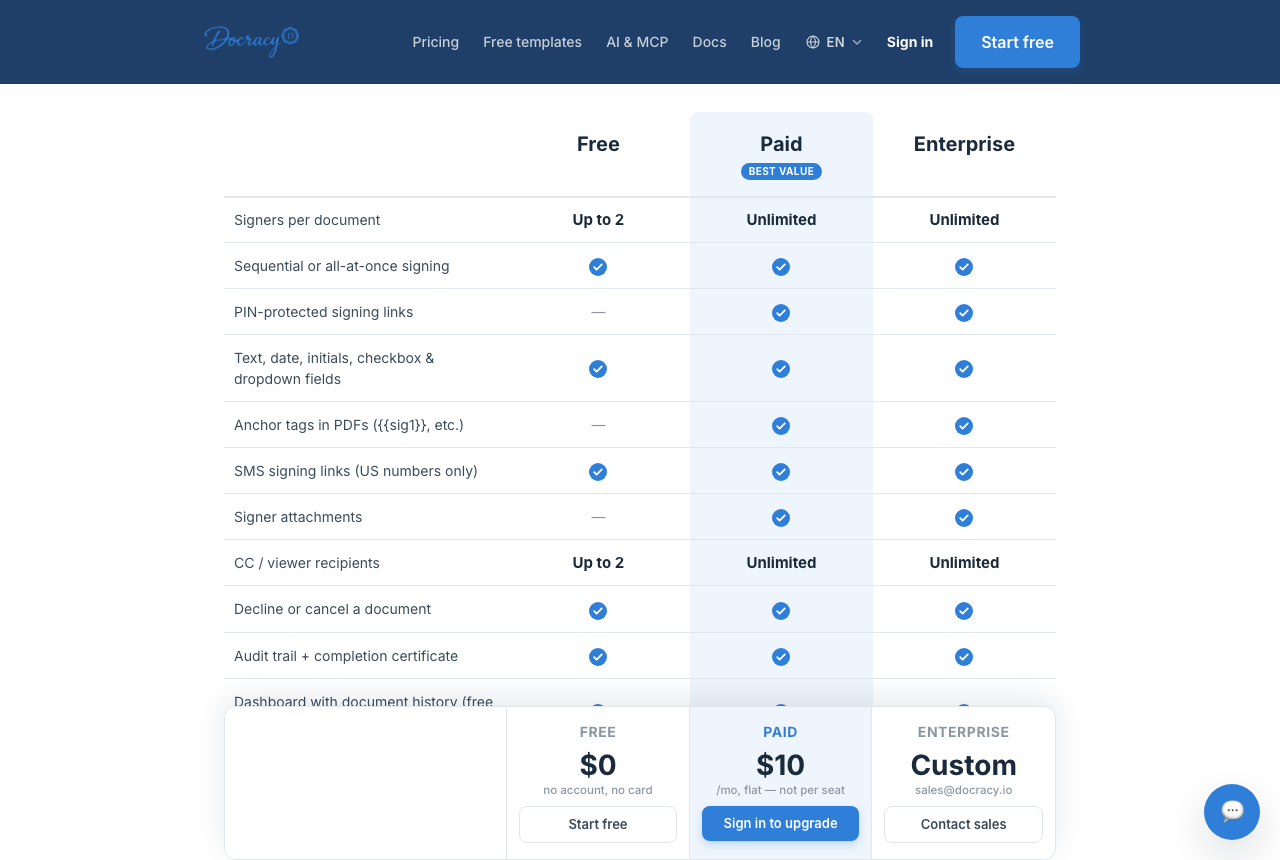
Most enterprise e-signature platforms price by seat: every person on your team who might ever need to send a document counts toward the bill, whether they send one contract a year or fifty a week. That model makes sense when you're licensing a company-wide rollout. It makes much less sense for a solo consultant or a five-person shop sending the occasional agreement. Docracy's pricing is built around signer count instead of seats: documents with up to two signers are free, and going beyond that is a flat $10 a month — not $10 per person, and not a tiered jump every time you add a user.
What "simple" agreements look like in practice
The agreements that don't need enterprise tooling tend to share a shape: two or three parties, signed once, done. An NDA between a founder and a contractor. A month-to-month lease between a landlord and a tenant. An offer letter between a company and a new hire. A one-page vendor agreement. None of these need bulk envelope sending, CRM sync, or identity-verified signatures — they need a document that goes out fast, gets signed without a login wall, and leaves a clear record that it happened.
Sequential vs. parallel signing
One place lighter tools sometimes fall short is ordering: if a document needs to be signed by one party before it's even shown to the next — say, a manager approving before it goes to HR — that requires sequential signing, not just a link blasted to everyone at once. Docracy supports both sequential and parallel multi-signer workflows, so switching to a simpler tool doesn't mean giving up control over signing order when it actually matters.
A pre-switch checklist
- Can the person signing do it without creating an account?
- Is there a real audit trail — delivery, read, and signature timestamps — not just a "signed" flag?
- Is the final signed file tamper-evident, ideally with a verifiable hash?
- Can you upload a PDF you already have, as-is, instead of rebuilding it in a proprietary editor?
- Does pricing stay flat if you occasionally need more than two signers, instead of jumping per seat?
Frequently asked questions
Is a DocuSign alternative less legally valid?
No — legal validity comes from the signing process meeting e-signature law requirements, not from brand recognition. A properly built lightweight tool produces a signature just as enforceable as DocuSign's.
What's the biggest tradeoff of switching to a simpler tool?
Fewer enterprise features — deep CRM integrations, advanced compliance certifications, bulk envelope management. For a small business or freelancer, those are rarely missed; for a large regulated organization, they usually are.
Can a lightweight tool still handle multiple signers in order?
It depends on the tool, but it's worth checking before you switch. Docracy, for example, supports both sequential signing (one signer at a time, in a set order) and parallel signing (everyone signs whenever they get to it), so ordering requirements don't force you back to a heavier platform.
Do I need identity verification for my agreements?
Most everyday agreements don't. A simple electronic signature (SES) — which proves what was signed and when — is the legal default and is sufficient for the vast majority of NDAs, freelance contracts, and leases. Identity-verified or qualified electronic signatures are a separate, higher legal tier reserved for specific regulated cases, and no lightweight tool, including Docracy, should be mistaken for a Qualified Trust Service Provider issuing those.
What if I occasionally need more than two signers?
That's exactly the case flat pricing is meant to cover. Docracy's free tier handles documents with up to two signers; anything beyond that is $10 a month total, not per additional signer or per seat, so an occasional larger agreement doesn't change your cost structure the way per-seat pricing would.
Will switching disrupt documents I've already sent with DocuSign?
No. Documents already signed and stored in DocuSign remain valid and accessible wherever they live today. Switching tools only affects agreements you send going forward — there's no need to migrate historical signatures.
See the full price comparison vs. DocuSign
Why teams start with Docracy
“Docracy is a great product that I have tested and am using. It is easy to use, has good tools, is always up to date, and implements new features. Highly recommended.”— DACH Advisory


Also: Compare e-sign pricing · Free mutual NDA template
No account required for up to 2 signers.